Free website audit tool
Free website audit: 72 checks for SEO, speed, accessibility and security
Enter your address and we check up to 25 pages the way your visitors and search engines see them: in a real browser, at phone size, with a lab speed test. You get a health score, every problem with the evidence behind it and how to fix it, and a PDF you can hand to whoever looks after your site.
- No signup
- Up to 25 pages
- Results in 2–5 minutes
- PDF report included

How does the free website audit work?
Three steps and no account. The audit runs on our servers, so there's nothing to install and no code to add to your site.
01
Enter your website address
Type the address you'd give a customer. We find your pages from your homepage links and your XML sitemap, and follow your robots.txt the way a search engine does.
02
We crawl, load and test your pages
Up to 25 pages are read and every link on them is checked. Pages load in a real Chrome browser at phone size for the accessibility and contact checks, and your homepage gets a lab speed test. You can watch each step as it runs.
03
Read the report, download the PDF
A health score out of 100, a score for each category, your most important problems first, and every check listed with its result. Each problem shows what was found, on which pages, why it matters and how to fix it.
See a sample website audit report
This is a real Professional audit of our own website, futurebuiltdigital.com, run with the same tool. We left the problems in.
Professional audit
www.futurebuiltdigital.com
Audited November 12, 2026 · 150 pages checked
- SEO10017 of 17 checks run · 21% of score
- Performance679 of 9 checks run · 21% of score
- Accessibility9712 of 12 checks run · 16% of score
- Contact and conversion968 of 8 checks run · 21% of score
- Content1004 of 4 checks run · 11% of score
- Security888 of 8 checks run · 11% of score
- Local SEONot applicable
Main content appears slowly (lab)Performance · on 1 page · Included in scoreHigh
Why it matters
People leave pages that take a long time to show their main content, particularly on mobile.
What was found · Evidence
- Page
- https://www.futurebuiltdigital.com/
- Device
- mobile
- Largest content shown (ms, lab)
- 3,097
- Threshold
- 2,500
How to fix
Inspect the LCP element and prioritize server response, render blocking, image loading, and delivery delays shown in the trace.
checked by lighthouse 1 · 2026-11-12 08:30 UTC · link
1The health score, with the share of scored checks that actually ran in the outer ring.
2Each category is scored on its own, so you can see where the points went.
3Every problem comes with the pages, the measured value and the fix.
What does the website audit check?
139 checks in seven categories. The free audit runs 72 of them on up to 25 pages. The Professional audit runs all 139 on up to 150 pages. Open a category to see every check.
SEO
19 free15 Professional
Broken links, redirect chains, robots.txt, XML sitemaps, noindex and canonical tags, page titles, meta descriptions, headings and structured data: whether search engines can find, read and index the pages you care about.
See every check (34)
- Links to your own pages work
- Pages load without server errors
- No redirect loops
- Redirects reach the page in one or two steps
- robots.txt allows search engines to read the homepage
- robots.txt loads
- Key pages can appear in search results
- Each page names one preferred address
- Canonical tags are valid
- Canonical addresses load
- XML sitemap can be read
- Sitemap listed in robots.txt loads
- Every page has a title
- Page titles are unique
- Page titles are specific
- Every page has a meta description
- Every page has a main heading (H1)
- Structured data has no syntax errors
- Structured data uses known types and properties
- Links to other websites workProfessional
- Internal links point to final addressesProfessional
- Important pages are a few clicks from the homepageProfessional
- Sitemap pages are linked from your siteProfessional
- robots.txt doesn't hide noindex tagsProfessional
- Canonical addresses can be indexedProfessional
- Similar pages name a preferred versionProfessional
- Sitemap and canonical tags agreeProfessional
- Sitemap lists only indexable pagesProfessional
- Sitemap lists preferred addressesProfessional
- Meta descriptions are uniqueProfessional
- Main heading matches the page titleProfessional
- Your business is described consistentlyProfessional
- Link text says where links goProfessional
- Social sharing preview is setProfessional
Page speed
10 free10 Professional
A lab speed test on a simulated phone and mobile connection: Largest Contentful Paint, Cumulative Layout Shift and Total Blocking Time, plus oversized images, page weight, compression, caching and files that hold up the first view.
See every check (20)
- Largest Contentful Paint (lab)
- Cumulative Layout Shift (lab)
- Total Blocking Time (lab)
- Lighthouse performance score (lab)
- Page download size
- Images are sized for how they're shown
- Main image loads early
- No files hold up the first view
- Text files are compressed
- Browsers can cache site files
- First Contentful Paint (lab)Professional
- Server response time (lab)Professional
- Images use efficient formatsProfessional
- Images below the fold load laterProfessional
- Little unused JavaScriptProfessional
- Little unused CSSProfessional
- Third-party scripts are lightProfessional
- No long pauses while loadingProfessional
- Fonts don't delay textProfessional
- Number of requests per pageProfessional
Accessibility
13 free8 Professional
Checks run in a real browser: image alt text, form labels, button and link names, color contrast, zoom on phones, page language, landmarks and tap target size.
See every check (21)
- Images have text descriptions
- Form fields have labels
- Buttons have names
- Links have names
- Text contrast
- Accessibility attributes are valid
- Hidden elements can't receive focus
- Page language is declared
- Main content region is marked
- Embedded frames have titles
- Zoom is allowed on phones
- Tap targets are large enough
- Icon-only controls have names
- Heading levels are in orderProfessional
- Data tables have header cellsProfessional
- Videos have captionsProfessional
- Keyboard focus is visibleProfessional
- Controls work with a keyboardProfessional
- Pop-ups keep keyboard focusProfessional
- Skip link past the menuProfessional
- Error messages are linked to their fieldsProfessional
Contact and conversion
10 free9 Professional
Whether a visitor can actually reach you: a contact page that loads, phone numbers you can tap, working booking links and menus, a clear next step on the homepage, and forms that fit a phone screen.
See every check (19)
- Clear way to contact you
- Contact page loads
- Phone numbers can be tapped
- Email addresses can be clicked
- Homepage has a clear next step
- Main call to action works
- Booking links work
- Forms fit on phones
- Menu links work
- Pages fit the phone screen
- Service pages have a next stepProfessional
- Button text says what happensProfessional
- Main button is visible on phonesProfessional
- Forms send somewhereProfessional
- Enquiry form lengthProfessional
- Mobile menu opensProfessional
- No pop-up covers the main actionProfessional
- Reviews, credentials or guarantees are visibleProfessional
- Forms link to a privacy noticeProfessional
Content
5 free9 Professional
Empty and placeholder pages, images that don't load, service pages that don't say what the service is, and pages that are copies of each other.
See every check (14)
- Pages have real content
- No placeholder text
- Images load
- Service pages describe the service
- No identical pages
- No near-identical pagesProfessional
- Service pages have distinct headingsProfessional
- Declared language matches the textProfessional
- Embedded videos loadProfessional
- No outdated offers or datesProfessional
- Text readabilityProfessional
- Spelling and grammarProfessional
- Key information is visible without clickingProfessional
- Downloadable documents loadProfessional
Security
10 free8 Professional
HTTPS and redirects to it, a valid SSL certificate for the right address, mixed content, security headers, cookie settings and forms that submit securely.
See every check (18)
- HTTPS is available
- HTTP redirects to HTTPS
- No insecure files on secure pages
- Security certificate is valid
- Security certificate matches the address
- Strict-Transport-Security header
- Content-Security-Policy header
- X-Content-Type-Options header
- Session cookies are marked Secure
- Forms submit over HTTPS
- Security certificate isn't about to expireProfessional
- Referrer-Policy headerProfessional
- Pages with forms can't be framed by other sitesProfessional
- Permissions-Policy headerProfessional
- Session cookies are HttpOnlyProfessional
- Cookies set SameSiteProfessional
- No JavaScript libraries with known vulnerabilitiesProfessional
- Server version is hiddenProfessional
Local SEO
5 free8 Professional
Your business name, address and phone number shown and consistent across pages, and LocalBusiness structured data that search engines and maps can read.
See every check (13)
- Phone number is shown
- Address is consistent across pages
- Phone number is consistent across pages
- Business name is clearly shown
- LocalBusiness structured data
- Structured data matches the pageProfessional
- Opening hours are machine-readableProfessional
- Service area is clearProfessional
- Locations are clearly separatedProfessional
- Map links workProfessional
- Location pages are linkedProfessional
- Contact details are visible without clickingProfessional
- Opening hours match structured dataProfessional
Professional website audit
Every check on up to 150 pages, with a roadmap for fixing them
The free audit is a real audit, not a teaser. Professional is for when you need the whole site checked and a plan to fix it: before a redesign, when you report to someone, or when you want to know what your web designer actually delivered.
Free audit
$0one per connection
- Up to 25 pages
- 72 checks in 7 categories
- Homepage speed test on mobile
- Top issues and every check listed
- PDF report
- Report kept for 7 days
Professional audit
$99one-time payment
- Up to 150 pages
- All 139 checks, including keyboard navigation, writing quality and near-duplicate pages
- Speed tests on up to 5 pages, mobile and desktop
- Roadmap grouped by cause: Fix now, Next, Later
- Deeper security, content and local SEO checks
- PDF with the roadmap and speed results
- Report never expires
Already ran a free audit? Upgrade from your report within 48 hours for $79.
What's in the Professional PDF
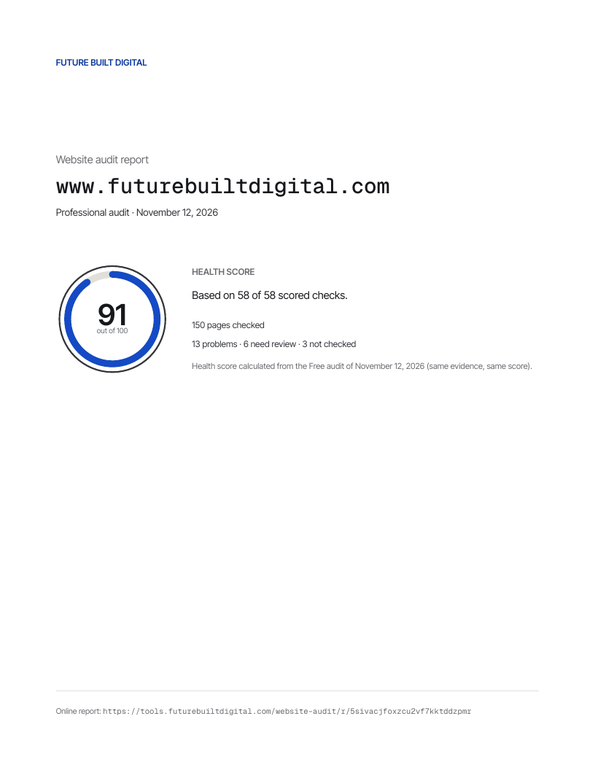
Summary and health score
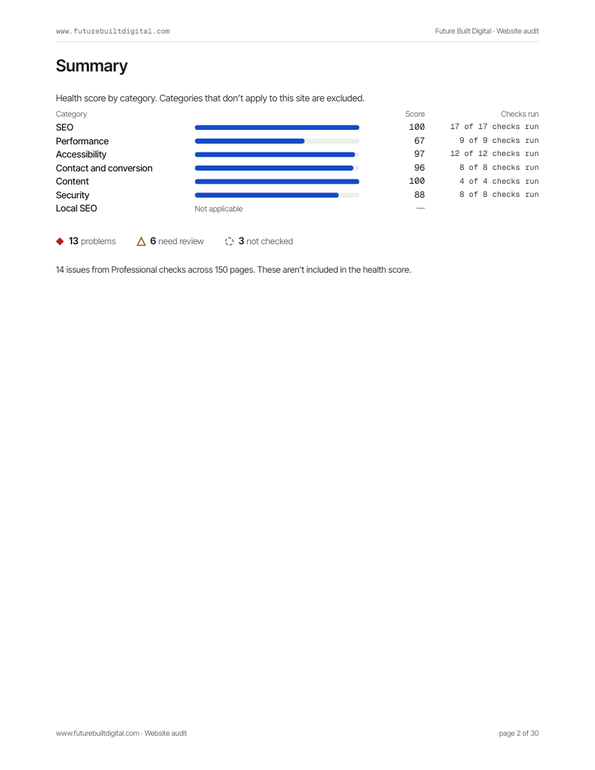
Category scores
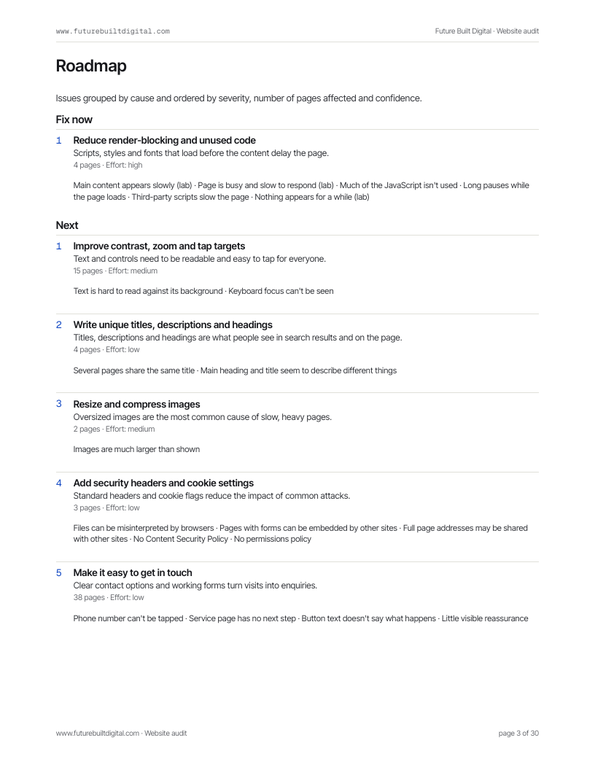
Roadmap: Fix now, Next, Later
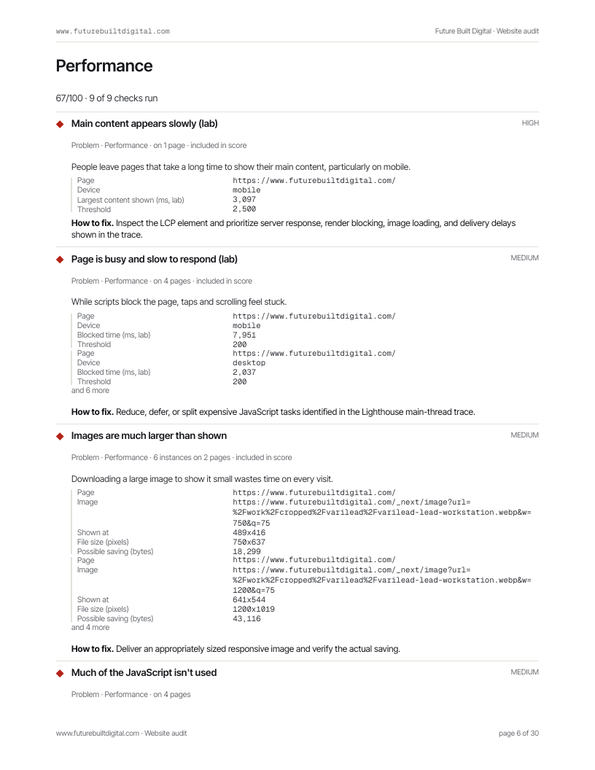
Every issue with evidence
Who buys the Professional audit
Before a redesign
Know which pages, links and fixes have to survive the move, so the new site doesn't lose what the old one did right.
When you report to someone
Hand a manager, partner or client a PDF with a score, evidence and a prioritized roadmap instead of a list of opinions.
After a web designer hands over a site
Check the work against 139 objective checks before the final invoice is paid.
When your site has more than 25 pages
The free audit checks a sample of 25 pages. Professional checks up to 150, so problems on deeper pages show up too.
How to read your website audit results
Every number in the report shows what it's based on. Here's what you'll see.
- 90–100Good. A few small fixes at most.
- 70–89Needs work. Real problems, usually a handful of causes.
- 0–69Poor. Problems visitors and search engines will notice.
The health score
A number from 0 to 100 built from the checks that ran on your pages. Confirmed problems lower it, weighted by severity and by how many pages they affect. The thin outer ring is coverage: the share of scored checks that actually ran. A 90 based on half the checks tells you less than a 75 based on all of them.
Every check has one result
Problem
A confirmed issue, with the evidence and how to fix it. Problems lower the score.
404 · /contact-us · linked from 6 pages
Needs review
A likely issue a person should confirm, such as thin content or low contrast on an image. It doesn't lower the score.
contrast 3.1:1 · minimum 4.5:1
Not checked
The check couldn't run, and the report says why. It's never counted as a pass.
blocked by robots.txt
Passed
The check ran and found nothing wrong. Every passed check is listed too.
25 of 25 pages
Lab speed, not real-visitor speed
Speed results come from a controlled test: a simulated mid-range phone on a mobile connection, run three times, with the middle result kept. That's the best way to find what slows a page down. It isn't the same as Google's field data from real Chrome users, which depends on your visitors' devices and connections.
What should you fix first after a website audit?
A report with 40 problems can feel like a lot. It usually isn't 40 jobs. Work in this order.
01
Anything that stops a visitor
Broken pages, server errors, dead links
A broken contact page costs you more than any title tag. Fix pages that fail to load and links that lead nowhere first: they hurt visitors today, and search engines find them on their next crawl.
Watch for: links in your header and footer. One broken link there is broken on every page.
02
The ways people reach you
Phone, booking, forms
Make sure your phone number can be tapped on a phone, your booking link opens and your forms work at phone size. These cost you enquiries directly, and they're usually quick fixes.
Watch for: Test them on your own phone after fixing. It takes two minutes.
03
One template, many pages
Fix the cause, not each page
When the same problem shows up on 20 pages, it's almost always one template, header or plugin. Fix it once and it clears everywhere. The report counts how many pages each problem affects, so these stand out.
Watch for: Missing alt text, duplicate titles and low contrast are usually template problems.
04
Pages search engines can't index
noindex, robots.txt, canonical tags
A stray noindex tag, a robots.txt rule or a canonical tag pointing somewhere else can quietly keep a service page out of Google. These are rare but serious, so check every critical SEO problem even if the list is short.
Watch for: Sites often keep a noindex tag from their staging version after launch.
05
Speed: the biggest file first
Images, video, heavy scripts
A slow small-business site is usually slow for one or two reasons: an oversized hero image, a background video or a heavy plugin script. The speed findings name the files. Start with the largest.
Watch for: Images saved at 4000 pixels wide and shown at 400.
06
Check again after the fixes go live
A fix is done when the check passes
Changes don't always deploy the way they were meant to. Once your fixes are live, run a Professional audit to confirm every check passes across the whole site.
Watch for: Keep the first report. It's your before picture.
Who is the website audit for?
Small-business owners
Find out what's wrong with your website in plain language, without paying someone just to find out.
Marketers
Check a site before a campaign sends traffic to it, and share a PDF with whoever makes the changes.
Agencies and freelancers
Audit a prospect's or client's site and bring evidence to the first conversation.
Anyone hiring a web designer
Get an objective baseline before a redesign, then check the new site against it.
What the audit does and doesn't do
The audit:
- Reads the public pages of the address you enter, up to the page limit.
- Follows your robots.txt and limits how fast it makes requests.
- Loads pages in a browser at phone size and runs a lab speed test.
- Checks the links on those pages, including booking and map links.
The audit doesn't:
- Log in or submit forms.
- Click buttons that change anything.
- Run vulnerability scans or penetration tests.
- Send your site to third-party analysis services.
Reports are private and only open with their link. Free reports are deleted 7 days after the audit. To limit free audits to one per connection we store a one-way fingerprint of your connection, not your IP address. The form uses Cloudflare Turnstile to block automated abuse.
Website audit FAQ
Is the website audit really free?
Yes. The free audit runs 72 checks on up to 25 pages and gives you the full report and a PDF. There's no signup and no card. Each internet connection gets one free audit.
What does the free website audit check?
72 checks across SEO, page speed, accessibility, contact and conversion, content, security and local SEO, on up to 25 pages of your site. Every check is listed in the section above.
How do I check my website for SEO problems for free?
Enter your address at the top of this page. The audit checks your pages for broken links, redirect problems, missing or duplicate titles and meta descriptions, noindex and canonical problems, sitemap and robots.txt errors, and structured data. Each problem lists the affected pages and how to fix it.
How long does a website audit take?
Usually 2–5 minutes, depending on the size and speed of the site. You can close the page while it runs; the report link works when it's done.
How much does a website audit cost?
The free audit costs nothing. The Professional audit is $99, one-time, for up to 150 pages and all 139 checks with a roadmap. If you upgrade from a free report within 48 hours, it's $79.
Is this the same as Google PageSpeed Insights?
The speed test uses the same engine, Lighthouse, in a lab with a simulated phone and mobile connection. PageSpeed Insights tests one page and can also show field data from real Chrome users. This audit covers what PageSpeed doesn't: links, indexing, contact paths, accessibility, security and local SEO across up to 25 pages.
Is the health score an SEO ranking score?
No. It summarizes the checks that ran on your pages. Confirmed problems lower it; items that need review and checks that didn't run don't. It doesn't predict search rankings.
Can I audit a competitor's website?
Yes. The audit reads only public pages, the same ones any visitor sees, and follows the site's robots.txt. It doesn't log in, submit forms or test for vulnerabilities.
Do I need to install anything or add code to my site?
No. The audit runs on our servers and reads your site from the outside, like a visitor would.
Why are some checks marked "Not checked"?
Something stopped the check from running: robots.txt blocked a page, a page timed out, or the site doesn't have that feature. The reason is shown in the report, and the check doesn't count toward the score.
What are lab speed results?
Your homepage is loaded three times in a controlled test with a simulated phone and mobile connection, and the middle result is used. Real visitors' speed varies with their device and connection.
What's in the Professional audit?
All 139 checks on up to 150 pages, speed tests on up to 5 pages on mobile and desktop, a roadmap that groups issues by cause into Fix now, Next and Later, and a report that doesn't expire. It adds keyboard navigation, writing quality, near-duplicate pages and deeper security and local SEO checks.
How often should I audit my website?
After any redesign, platform change or large content update, and otherwise every few months. Sites drift: plugins update, pages get added, and links break when other sites move.
Is my report private?
Yes. A report only opens with its private link, isn't indexed by search engines, and free reports are deleted after 7 days.
More free website checks
- Free SEO checker
Broken links, indexing, titles, sitemaps and structured data.
- Free website speed test
Lab speed test and Core Web Vitals on a simulated phone.
- Free accessibility checker
Alt text, labels, contrast, zoom and tap targets in a real browser.
- Free local SEO checker
NAP consistency, LocalBusiness schema and contact paths.
Run a free website audit
72 checks, up to 25 pages, about 2–5 minutes. No signup.